

Introduction: The World of Safari Extensions
In today’s fast-paced digital ecosystem, users expect browsers to do more than simply load webpages—they want efficiency, personalization, and tools that align with modern workflows. This is where Safari extensions truly shine. Built to enhance Safari’s already powerful architecture, Safari extensions
enable users to tailor their browsing experience in meaningful, productivity-focused ways.
From content blockers and password managers to automation utilities and media tools, Safari extensions expand what Safari can do far beyond its default capabilities. Whether you’re streamlining research, organizing tabs, or controlling media playback, the right Safari extension
can transform your workflow instantly.
Moreover, Apple has made discovering and installing Safari extensions remarkably simple. Users can browse curated collections on the Mac App Store or explore dedicated platforms such as the official Safari Web Extensions Gallery. Once found, installing a Safari extension
is effortless: download it like any app, enable it from Safari’s preferences, and it becomes part of your browsing toolkit.
For anyone seeking to speed up video, gain better control over media playback, or make online learning more efficient, one standout tool deserves special attention: SpeedPlay for Safari.
What Is SpeedPlay for Safari?
SpeedPlay for Safari is a lightweight yet powerful media-enhancement Safari extension
designed to give users complete control over HTML5 video and audio playback speed. At its core, it solves a problem nearly every browser user encounters: media that plays too slowly—or occasionally, too quickly—for our needs.
Whether you’re watching tutorials, taking online courses, reviewing long meetings, or speeding through news videos, playback speed matters. The default speed options in many web players are often limited or hidden, forcing users to hunt through awkward interfaces or accept rigid presets.
This is where SpeedPlay for Safari comes in. With precise speed controls, on-screen tools, customizable presets, and seamless Safari integration, it offers a flexible and intuitive way to take charge of your media consumption across the web.
Why SpeedPlay for Safari Is a Must-Have for Safari Users
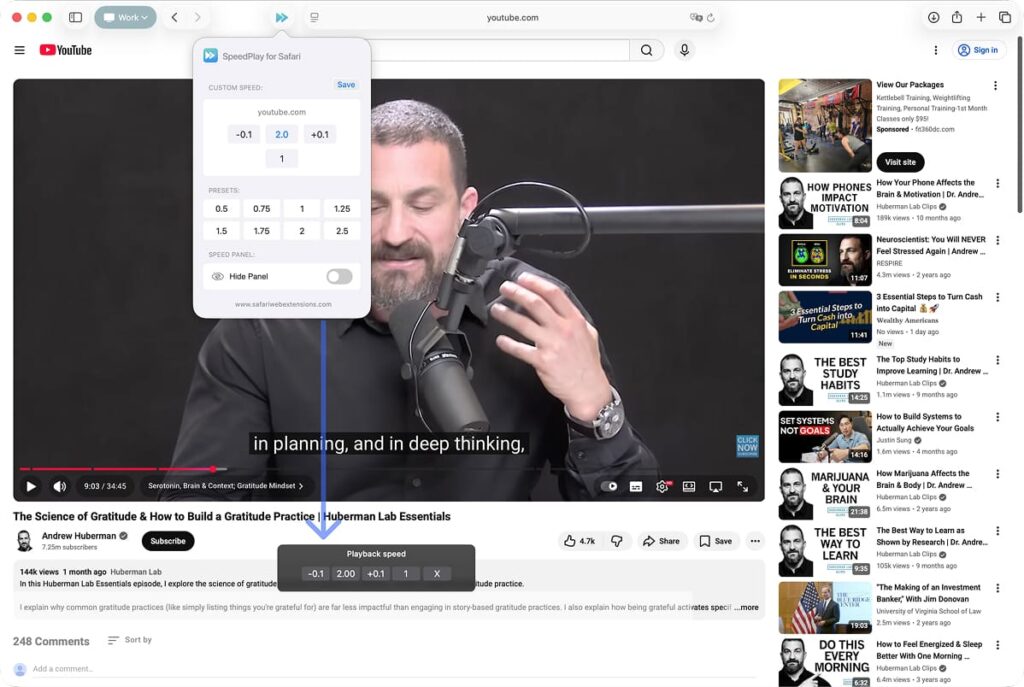
The value proposition is simple: control. With more people relying on browser-based video than ever—think YouTube, streaming platforms, e-learning portals, podcasts, and embedded news clips—having the ability to speed up video or slow it down can dramatically improve productivity.
Want to review a lecture at 1.75× speed? Need to slow a tutorial to 0.5× to follow detailed instructions? Prefer all videos on a specific site to default to 1.25×?
SpeedPlay for Safari does all of that effortlessly.
But beyond convenience, there’s efficiency. Many professionals and students use playback-speed tools to reclaim hours each week simply by speeding up video. For casual users, it delivers a smoother, more enjoyable browsing experience without clutter or complexity. It’s one of those rare tools that feels small at first but quickly becomes indispensable.
Top Features of SpeedPlay for Safari
• Custom Speed Per Website
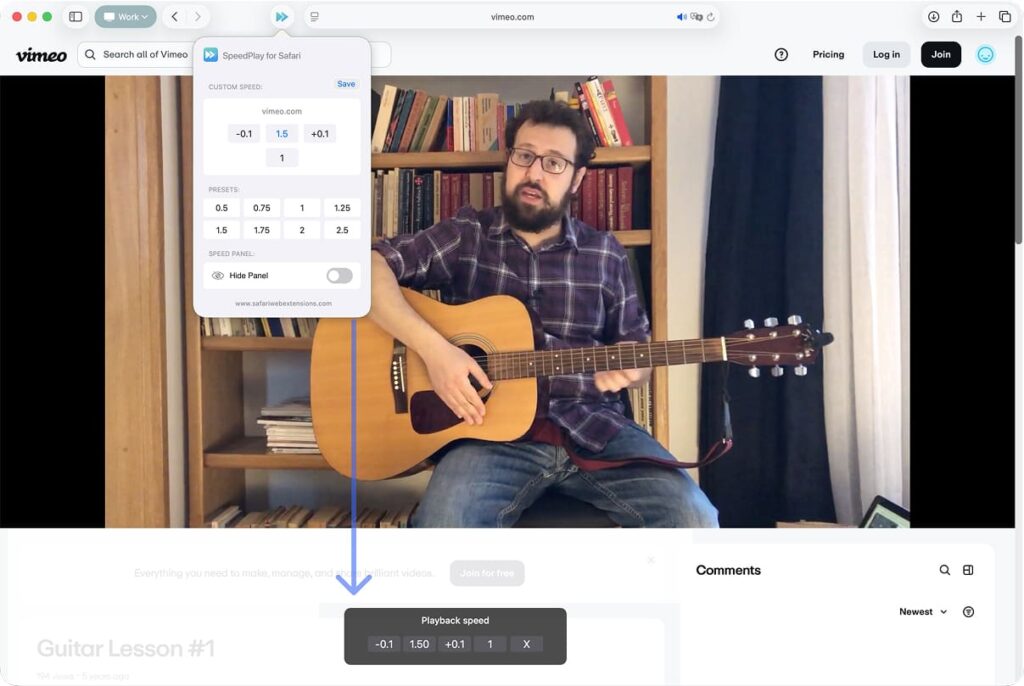
Set a preferred speed for each site you visit, and SpeedPlay for Safari will remember it. If you always watch tutorials at 1.5×, the extension handles it automatically on future visits—no manual adjustment required.
• Speed Presets
Quick-access presets let you jump between common playback speeds instantly. Ideal for users who frequently adjust how fast they watch videos depending on the content type.
• Shortcut-Enabled Controls
Keyboard shortcuts make it easy to speed up video, slow it down, or reset to default without reaching for the mouse. This shortcut-driven workflow makes rapid adjustments feel natural and effortless.
• On-Screen Control Panel Overlay
An intuitive floating control panel appears on videos, letting you tweak speeds visually. It’s clean, unobtrusive, and feels native to Safari’s design language.
• Full Safari Integration Across Apple Devices
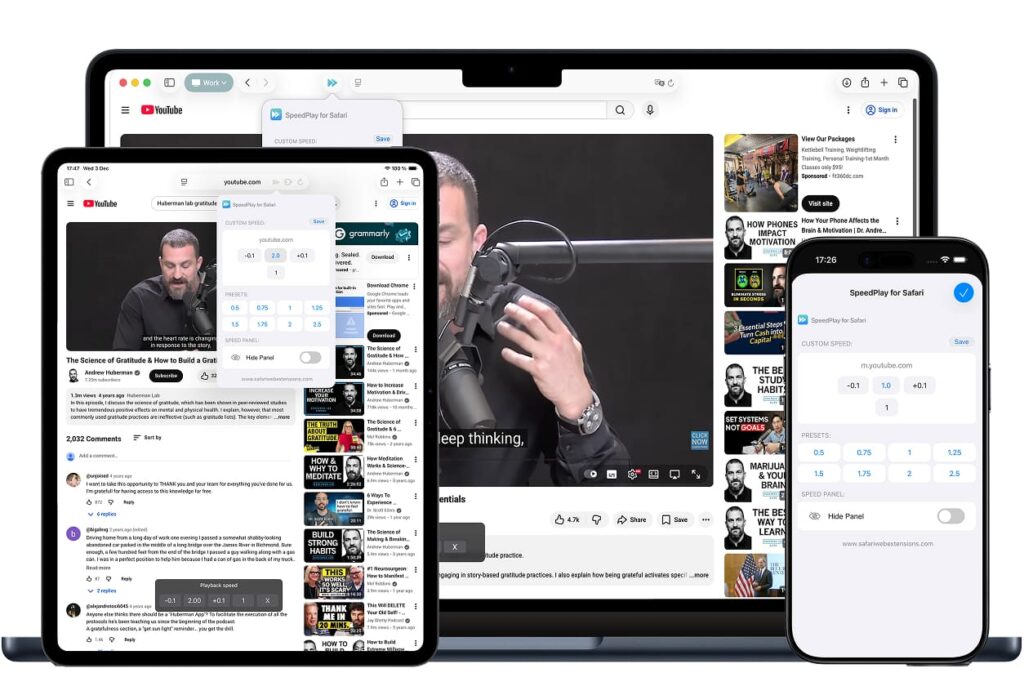
SpeedPlay for Safari syncs beautifully across macOS and iOS, ensuring your preferred controls and custom speeds work the same way on Mac, iPhone, and iPad.
• Clean, User-Friendly UI
Its minimalist interface ensures the tool enhances your workflow without adding clutter. Everything is thoughtfully designed to blend with Safari’s overall aesthetic.
• Multilingual Support
A globally friendly interface helps non-English speakers use the extension comfortably, supporting a diverse audience.
• Privacy-First Design
No tracking. No data collection. No analytics. Just a straightforward, offline-first tool that respects your privacy—a hallmark of well-designed Safari extensions.
How to Install SpeedPlay for Safari
Installing this media-control powerhouse takes less than a minute:
- Visit the SpeedPlay for Safari page in the Mac App Store or iOS App Store.
- Download and install the app.
- Open Safari and go to Safari > Settings (or Preferences) > Extensions.
- Find SpeedPlay in the list and toggle it on.
- Grant any necessary permissions so Safari can apply custom playback controls to webpages.
The extension is compatible with modern versions of macOS and iOS/iPadOS that support Web Extensions in Safari.
How to Use SpeedPlay for Safari for Maximum Efficiency
Once installed, using the tool becomes second nature.
- Adjust speeds on the fly using keyboard shortcuts—ideal when you’re multitasking.
- Use the control panel overlay to fine-tune playback without interrupting the video.
- Create site-specific speed defaults for platforms you visit frequently, like online courses or news sites.
- Experiment with presets to find your ideal learning or viewing pace.
Real-world example: A coding tutorial may require slowing playback to 0.75× to view detail, while a long meeting recording might be perfect at 2×. With SpeedPlay for Safari, those adjustments are instant.
How SpeedPlay for Safari Boosts Productivity
For professionals, students, and anyone handling large amounts of video content, playback control is an efficiency game-changer.
- Reduce hours of training videos to a fraction of the time.
- Consume news or research content more quickly.
- Improve comprehension by slowing down dense instructional material.
- Enhance workflow fluidity with shortcut-based speed control.
Whether you’re editing media, learning a new skill, or reviewing recorded Zoom meetings, SpeedPlay for Safari helps you regain valuable time without sacrificing comprehension.
Who Can Benefit from SpeedPlay for Safari?
This extension is ideal for:
- Students watching lectures or tutorials
- Professionals reviewing trainings or meeting recordings
- Researchers consuming large volumes of video-based content
- Educators who need playback control for study materials
- Language learners who benefit from adjusting speech tempo
- Casual viewers who simply want more control over how they watch videos
- Anyone wishing to speed up video or audio in Safari
Whether you’re binge-learning or casually browsing, the payoff is immediate.
Security and Privacy of SpeedPlay for Safari
Privacy matters, especially in browser tools. SpeedPlay for Safari is built with a strict privacy-first approach:
- No user data collection
- No tracking
- No analytics or third-party sharing
It functions entirely on-device, modifying playback elements already present in the webpage without sending any information elsewhere.
For privacy-conscious users—a growing segment of the web population—this commitment is a significant advantage.
Where to Download SpeedPlay for Safari
You can download SpeedPlay for Safari directly from the App Store. Every installation includes access across your Apple devices, making it a powerful, unified tool for your browsing ecosystem.
Conclusion: Simplify Your Workflow with SpeedPlay for Safari
In a world where efficiency is everything, controlling how you consume media online is no longer a luxury—it’s essential. SpeedPlay for Safari delivers elegant, intuitive tools that make every video more adaptable to your needs. With customizable speeds, keyboard shortcuts, on-screen controls, and privacy-centric design, it’s one of the most impactful Safari extensions available today.
If you’re ready to transform how you watch, learn, and work online, download SpeedPlay for Safari and experience playback freedom on your own terms.